Components
On this page are all standard components of Hadron listed that can be used. These components can usually be used most of the time independently of the page type.
This page contains descriptions, syntax, and examples for the components to facilitate their use. Some components require additional plugins, which are already included in the Hadron Skeleton.
Comment
!!! Default Component
!!! Comments can be inserted in Markdown to hide text that should not be displayed on the page, but is visible to other authors.
!!! The comment is still visible in the page source, so it should not be used for confidential information.
<!--
This comment will not be displayed on the page, but is visible in the source code.
-->
Headings
!!! Default Component
!!! Headings are used to structure and organize the text. Headings can have levels from H1 to H6, with H1 being the highest level and H6 the lowest.
H1 Heading
H2 Heading
H3 Heading
H4 Heading
H5 Heading
H6 Heading
# H1 Heading

## H2 Heading

### H3 Heading

#### H4 Heading

##### H5 Heading

###### H6 Heading
Paragraphs
!!! Default Component
!!! Paragraphs are sections of text that are separated by a blank line. Line breaks within a paragraph are ignored unless they are marked with two spaces at the end of the line.
Lorem ipsum dolor sit amet, consectetur adipiscing elit. Praesent risus leo, dictum in vehicula sit amet, feugiat tempus tellus. Duis quis sodales risus.
Etiam euismod ornare consequat.

Lorem ipsum dolor sit amet, consectetur adipiscing elit. Praesent risus leo, dictum in vehicula sit amet, feugiat tempus tellus. Duis quis sodales risus. Etiam euismod ornare consequat.
Lorem ipsum dolor sit amet, consectetur adipiscing elit. Praesent risus leo, dictum in vehicula sit amet, feugiat tempus tellus. Duis quis sodales risus.
Etiam euismod ornare consequat.
Lorem ipsum dolor sit amet, consectetur adipiscing elit. Praesent risus leo, dictum in vehicula sit amet, feugiat tempus tellus. Duis quis sodales risus. Etiam euismod ornare consequat.Markdown elements
!!! Default Component
!!! Markdown elements are special text formats that can be used in Markdown. These can also be used in other Markdown editors.
Bold **Bold**
Italic _Italic_
Strikethrough ~~Strikethrough~~
Inline Code `Inline Code`
Blockquote
> Blockquote
Link [Link](https://example.com)
Link with Title [Link with Title](https://example.com "Title of the Links")
Horizontal Line: ---
HTML text elements
!!! Default Component
!!! HTML elements can be used in Markdown to add special text formatting that is not supported in Markdown, but is generally used on websites.
I18N <abbr>
Blockquote <cite>
Ctrl + S <kbd>
TextSuperscripted <sup>
TextSubscripted <sub>
x = y + 2 <var>
Media
!!! Default Component
!!! Media is inserted in Markdown similar to links, but with an exclamation mark (!) before the link.
!!! Supported media include images, videos, and audio files.
!!! More information about media can be found in the official Grav documentation
Images
!!! Syntax: 

Image with Link
!!! An image that also works as a link.
!!! Syntax: [](Link)
[](https://example.com)Image with Options
!!! Syntax: 
!!! Options:
!!! - lightbox - opens the image in a lightbox when clicked
!!! - resize=200 - resizes the image to a width of 200 pixels
Videos
!!! Syntax: 
!!! - autoplay[=1|0] - 1: starts the video automatically (default: 0)
!!! - loop[=1|0] - 1: repeats the video (default: 0)
!!! - controls[=1|0] - 1: shows the controls (default: 1)
!!! - muted[=1|0] - 1: mutes the video (default: 0)
Audio
!!! Syntax: 
!!! - autoplay[=1|0] - 1: starts the audio automatically (default: 0)
!!! - loop[=1|0] - 1: repeats the audio (default: 0)
!!! - controls[=1|0] - 1: shows the controls (default: 1)
!!! - muted[=1|0] - 1: mutes the audio (default: 0)
YouTube (Variant 1)
!!! depends on YouTube Plugin
!!! Syntax: [plugin:youtube](Video-path)
[\plugin:youtube](https://www.youtube.com/watch?v=K4TOrB7at0Y)YouTube (Variant 2)
!!! depends on YouTube Plugin
!!! Syntax: [\youtube OPTIONS] https://www.youtube.com/watch?v=VIDEO-PATH [/youtube]
!!! - autoplay[=1|0] - 1: starts the video automatically (default: 0)
!!! - controls[=1|0] - 1: shows the controls (default: 1)
!!! - loop[=1|0] - 1: repeats the video (default: 0)
[youtube autoplay=1 controls=0 loop=1]
https://www.youtube.com/watch?v=K4TOrB7at0Y
[/youtube]
[youtube autoplay=1 controls=0 loop=1]
https://www.youtube.com/watch?v=K4TOrB7at0Y
[/youtube]_see Crabston Tutorials > Plugins > Shortcode Media_
Dokumente
_see Crabston Tutorials > Plugins > Shortcode Media_
Code
!!! Default Component
!!! Code blocks can be inserted in Markdown to display code or scripts. These can also be highlighted with syntax highlighting by specifying the language of the code.
// Code
const foo = 'bar';
function bar() {
  return foo;
}
console.log(bar());
\```js
// Code
const foo = 'bar';
function bar() {
return foo;
}
console.log(bar());
\```Blockquote
!!! Default Component
!!! Blockquotes are elements that can be used in Markdown to highlight text. They can also be combined with other elements.
The advance of technology is based on making it fit in so that you don't really even notice it, so it's part of everyday life.
- Bill Gates
> The advance of technology is based on making it fit in so that you don't really even notice it,
> so it's part of everyday life.
>
> <cite>- Bill Gates</cite>
Lists
!!! Default Component
!!! Lists can be used in Markdown to display items in an ordered or unordered manner. Lists can also be nested.
unordered lists
- List Item 1
- List Item 2
  - List Item 2.1
  - List Item 2.2
    - List Item 2.2.1
- List Item 3
- List Item 1
- List Item 2
- List Item 2.1
- List Item 2.2
- List Item 2.2.1
- List Item 3ordered lists
- List Item 1
- List Item 2
- List Item 2.1
- List Item 2.2
- List Item 2.2.1
- List Item 3
1. List Item 1
2. List Item 2
  1. List Item 2.1
  2. List Item 2.2
    1. List Item 2.2.1
3. List Item 3
Tables
!!! Default Component
!!!Tables can be created in Markdown to display data in a tabular format.
!!! To do this, it should be noted that the alignment of the columns is defined in the second row:
!!! - :---: left-aligned
!!! - :---:: centered
!!! - ---:: right-aligned
!!!
!!! Another feature of tables is that they are displayed correctly even if the formatting with spaces is not correct.
| Name | Genre | Published |
|---|---|---|
| The Shawshank Redemption | Crime, Drama | 14. Oktober 1994 |
| The Godfather | Crime, Drama | 24. März 1972 |
| Schindler's List | Biography, Drama, History | 4. Februar 1994 |
| No Genre | 7. Mai 1990 | |
| Se7en | Crime, Drama, Mystery | 22. September 1995 |
| Name                     |           Genre           |          Published |
|:-------------------------|:-------------------------:|-------------------:|
| The Shawshank Redemption |       Crime, Drama        |   14. Oktober 1994 |
| The Godfather            |       Crime, Drama        |      24. März 1972 |
| Schindler's List         | Biography, Drama, History |    4. Februar 1994 |
| No Genre                 |                           |        7. Mai 1990 |
| Se7en                    |   Crime, Drama, Mystery   | 22. September 1995 |
mobile-friendly tables
!!! depends on Hadron Theme
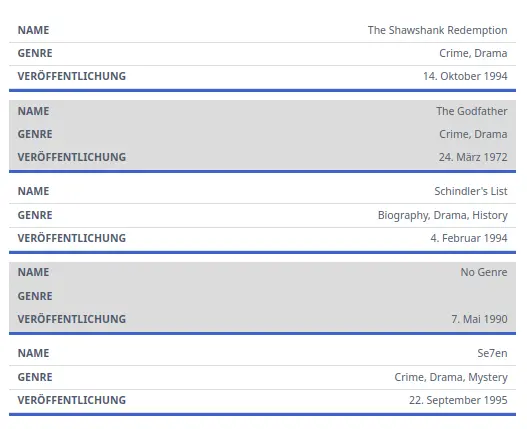
!!! With a special feature of the Hadron theme, tables are also displayed well on mobile devices (mainly necessary for wide tables). The table is then displayed as follows:
!!! 
[div class="table-responsive"]

| Name                     |           Genre           |          Published |
|:-------------------------|:-------------------------:|-------------------:|
| The Shawshank Redemption |       Crime, Drama        |   14. Oktober 1994 |
| The Godfather            |       Crime, Drama        |      24. März 1972 |
| Schindler's List         | Biography, Drama, History |    4. Februar 1994 |
| No Genre                 |                           |        7. Mai 1990 |
| Se7en                    |   Crime, Drama, Mystery   | 22. September 1995 |
[/div]
Shortcode elements
!!! depends on Shortcode Core Plugin
!!! Shortcodes are special tags that can be used in Markdown to add special functions or components. These are written in square brackets [] and require the Shortcode Plugin.
This is a sample text with this highlighted part and Markdown syntax and the rest is normal.
This is an underlined text.
This is a sample text [mark]with this **highlighted** part and _Markdown_ syntax[/mark] and the rest is normal.

This is an [u]underlined text[/u].
Alignment
!!! depends on Shortcode Core Plugin
!!! With alignment, texts can be aligned to the left, centered, or right.
This text is left aligned.
This text is centered.
This text is right aligned.
[left]
This text is left aligned.
[/left]

[center]
This text is centered.
[/center]

[right]
This text is right aligned.
[/right]
Columns
!!! depends on Shortcode Core Plugin
!!! Columns are used to split text into multiple columns.
!!! Docs: Shortcode Core Plugin
Lorem ipsum dolor sit amet, consectetur adipisicing elit, sed do eiusmod tempor incididunt ut labore et dolore magna aliqua. Ut enim ad minim veniam, quis nostrud exercitation ullamco laboris nisi ut aliquip ex ea commodo consequat.
Duis aute irure dolor in reprehenderit in voluptate velit esse cillum dolore eu fugiat nulla pariatur. Excepteur sint occaecat cupidatat non proident, sunt in culpa qui officia deserunt mollit anim id est laborum.
[columns count=2]
Lorem ipsum dolor sit amet, consectetur adipisicing elit, sed do eiusmod
tempor incididunt ut labore et dolore magna aliqua. Ut enim ad minim veniam,
quis nostrud exercitation ullamco laboris nisi ut aliquip ex ea commodo
consequat.

Duis aute irure dolor in reprehenderit in voluptate velit esse
cillum dolore eu fugiat nulla pariatur. Excepteur sint occaecat cupidatat non
proident, sunt in culpa qui officia deserunt mollit anim id est laborum.
[/columns]
Details
!!! depends on Shortcode Core Plugin
!!! Details are a good way to hide content that is not important for the main flow of the document. These can be displayed by clicking on the button.
!!! Docs: Shortcode Core Plugin
Click here to show more information
Here are additional details that can be revealed by clicking the button.
[details="Click here to show more information"]
Here are additional details that can be revealed by clicking the button.
[/details]
Notices
!!! depends on Markdown Notices Plugin
!!! Notices can be used to highlight important information.
! Warning

!! Error

!!! Info

!!!! Success
! Warning
!! Error
!!! Info
!!!! SuccessAccordion
!!! depends on Shortcode UI Plugin
!!! Accordions are used to divide content into sections that can be opened or closed as needed.
Bacon ipsum dolor amet beef burgdoggen shoulder, meatball prosciutto kevin brisket chicken turkey. Kevin rump pancetta short loin capicola brisket landjaeger fatback picanha pork belly ribeye. Strip steak chuck turducken kevin t-bone ribeye cupim capicola alcatra rump. Venison pork chop biltong cupim pig rump meatloaf sausage pork. Strip steak kevin tongue brisket ball tip, venison turducken flank frankfurter corned beef pancetta fatback drumstick ham. Drumstick pastrami leberkas meatball flank tongue turkey ground round pork belly doner frankfurter porchetta jowl.
[/ui-accordion-item] [ui-accordion-item title="Sections 2"]Short loin swine shankle flank picanha andouille burgdoggen landjaeger hamburger drumstick. Beef ham tail, tri-tip flank ham hock meatball picanha corned beef t-bone shank turkey ball tip shoulder. Flank corned beef chicken, meatloaf venison ball tip ham hock tail salami jowl short ribs pork belly drumstick. Meatball chicken hamburger beef filet mignon doner pork picanha pork chop fatback rump ham tri-tip ball tip landjaeger. Sausage leberkas shoulder tongue short loin shankle. Prosciutto tri-tip frankfurter shoulder drumstick capicola. Pork loin shank strip steak pork belly tongue cow.
[/ui-accordion-item] [ui-accordion-item title="Sections 3"]Bacon ipsum dolor amet beef burgdoggen shoulder, meatball prosciutto kevin brisket chicken turkey. Kevin rump pancetta short loin capicola brisket landjaeger fatback picanha pork belly ribeye. Strip steak chuck turducken kevin t-bone ribeye cupim capicola alcatra rump. Venison pork chop biltong cupim pig rump meatloaf sausage pork. Strip steak kevin tongue brisket ball tip, venison turducken flank frankfurter corned beef pancetta fatback drumstick ham. Drumstick pastrami leberkas meatball flank tongue turkey ground round pork belly doner frankfurter porchetta jowl.
[/ui-accordion-item] [/ui-accordion][ui-accordion independent=false open=1]
[ui-accordion-item title="Section 1"]
Bacon ipsum dolor amet beef burgdoggen shoulder, meatball prosciutto kevin brisket chicken turkey. Kevin rump pancetta short loin capicola brisket landjaeger fatback picanha pork belly ribeye. Strip steak chuck turducken kevin t-bone ribeye cupim capicola alcatra rump. Venison pork chop biltong cupim pig rump meatloaf sausage pork. Strip steak kevin tongue brisket ball tip, venison turducken flank frankfurter corned beef pancetta fatback drumstick ham. Drumstick pastrami leberkas meatball flank tongue turkey ground round pork belly doner frankfurter porchetta jowl.
[/ui-accordion-item]
[ui-accordion-item title="Section 2"]
Short loin swine shankle flank picanha andouille burgdoggen landjaeger hamburger drumstick. Beef ham tail, tri-tip flank ham hock meatball picanha corned beef t-bone shank turkey ball tip shoulder. Flank corned beef chicken, meatloaf venison ball tip ham hock tail salami jowl short ribs pork belly drumstick. Meatball chicken hamburger beef filet mignon doner pork picanha pork chop fatback rump ham tri-tip ball tip landjaeger. Sausage leberkas shoulder tongue short loin shankle. Prosciutto tri-tip frankfurter shoulder drumstick capicola. Pork loin shank strip steak pork belly tongue cow.
[/ui-accordion-item]
[ui-accordion-item title="Section 3"]
Bacon ipsum dolor amet beef burgdoggen shoulder, meatball prosciutto kevin brisket chicken turkey. Kevin rump pancetta short loin capicola brisket landjaeger fatback picanha pork belly ribeye. Strip steak chuck turducken kevin t-bone ribeye cupim capicola alcatra rump. Venison pork chop biltong cupim pig rump meatloaf sausage pork. Strip steak kevin tongue brisket ball tip, venison turducken flank frankfurter corned beef pancetta fatback drumstick ham. Drumstick pastrami leberkas meatball flank tongue turkey ground round pork belly doner frankfurter porchetta jowl.
[/ui-accordion-item]
[/ui-accordion]Tabs
!!! depends on Shortcode UI Plugin
!!! Tabs can be used to display content in different tabs.
In tempor sed sapien eu porttitor. Aliquam cursus facilisis ante. Etiam neque nunc, blandit vel lacus et, faucibus accumsan lacus. Proin posuere varius purus quis faucibus. Quisque et enim vitae orci placerat tincidunt id ac eros. Fusce et gravida libero.
Phasellus cursus odio ex, in mattis lorem tincidunt vel. Donec nibh odio, dapibus non ligula a, semper ornare massa. Nulla consectetur eu nunc sed ultrices. Integer at turpis dolor.
[/ui-tab] [ui-tab title="Second Tab"]In tempor sed sapien eu porttitor. Aliquam cursus facilisis ante. Etiam neque nunc, blandit vel lacus et, faucibus accumsan lacus. Proin posuere varius purus quis faucibus. Quisque et enim vitae orci placerat tincidunt id ac eros. Fusce et gravida libero.
Phasellus cursus odio ex, in mattis lorem tincidunt vel. Donec nibh odio, dapibus non ligula a, semper ornare massa. Nulla consectetur eu nunc sed ultrices. Integer at turpis dolor.
[/ui-tab] [/ui-tabs][ui-tabs position=top-left active=0 theme=lite]
[ui-tab title="First Tab"]
In tempor sed sapien eu porttitor. Aliquam cursus facilisis ante. Etiam neque nunc, blandit vel lacus et, faucibus accumsan lacus. Proin posuere varius purus quis faucibus. Quisque et enim vitae orci [placerat tincidunt](#) id ac eros. Fusce et gravida libero.
Phasellus cursus odio ex, in **mattis lorem tincidunt** vel. Donec nibh odio, dapibus non ligula a, semper ornare massa. Nulla consectetur eu nunc sed ultrices. Integer at turpis dolor.
[/ui-tab]
[ui-tab title="Second Tab"]
In tempor sed sapien **eu porttitor**. Aliquam cursus facilisis ante. Etiam neque nunc, blandit vel lacus et, faucibus accumsan lacus. Proin posuere varius purus quis faucibus. [Quisque et enim](#) vitae orci placerat tincidunt id ac eros. Fusce et gravida libero.
Phasellus cursus odio ex, in mattis lorem tincidunt vel. [Donec nibh odio](#), dapibus non ligula a, semper ornare massa. Nulla consectetur eu nunc sed ultrices. Integer at turpis dolor.
[/ui-tab]
[/ui-tabs]Gallery
!!! depends on Shortcode Gallery Plugin
!!! Galleries can be used to display multiple images in a gallery.
!!! Options:
!!! - lastRow=justify - Justify the last row
!!! - captions=false - Hide captions
!!! Docs: Shortcode Gallery++ Plugin
[gallery lastRow=justify]









 [/gallery]
[gallery lastRow=justify]


[/gallery]Owl Carousel
!!! depends on Shortcode Owl Carousel Plugin
!!! Owl Carousel is a plugin that is used to display images in a carousel.
!!! Options:
!!! - items=1 - Number of items to display
!!! - margin=10 - Margin between items
!!! - loop=true - Infinite loop
!!! - nav=true - Show navigation
!!! - stagePadding=200 - Padding to the edge
!!! Docs: Shortcode Owl Carousel Plugin
[owl-carousel items=1 margin=10 loop=true nav=true stagePadding=200]
[/owl-carousel]
[owl-carousel items=1 margin=10 loop=true nav=true stagePadding=200]


[/owl-carousel]