Ollama on Intel Celeron, Part III: Building an AI Chatbot for Grav CMS
Fast, Local, and 6-Watt Powered: Squeezing an AI Chatbot into Grav CMS

In the previous article, Self-Hosting Local AI on a Celeron N4100 Laptop, I proved that a low-spec, 6-Watt Celeron laptop with 8 GB of RAM could comfortably run Ollama and serve lightweight models like Qwen2.5 (0.5B).
Running a model in a vacuum is fun, but the real question was: can this potato of a machine act as a live, intelligent documentation chatbot for my website — without melting the CPU or making visitors stare at a blank screen for 120 seconds?
The answer is yes — and along the way, what started as a simple keyword-matching script grew into a proper little pipeline. Here's how grav-ai-chatbot actually works today.
The Challenge: 8 GB of RAM and No AVX2
Most AI-powered search (Retrieval-Augmented Generation, or RAG) leans on heavy vector databases like ChromaDB or Qdrant. These require running a second "embedding model" in RAM just to convert text into math the AI can search over.
On an Intel Celeron N4100, that plan falls apart fast:
- RAM is scarce. Running an LLM and a vector embedding model at once leaves nothing for the system cache to breathe.
- No AVX2. Vector math without AVX2 SIMD instructions causes serious CPU throttling — pushing prompt delays up to 30–45 seconds per query, right back to the problem Part I solved.
So the goal from day one was the same: never ask the AI a question it doesn't strictly need to answer, and never make the CPU do work it can avoid.
From "One Search Trick" to a 5-Tier Pipeline
The first version of this plugin was basically one clever trick: strip filler words, run a keyword search, hand the result to Ollama. It worked, but it also meant every single message — even "hi" or "what's your refund policy" — went straight to an AI model.
The current version is smarter about it. Every visitor message now runs through a 5-tier pipeline, and the request only reaches an AI model if nothing cheaper and faster could answer it first:
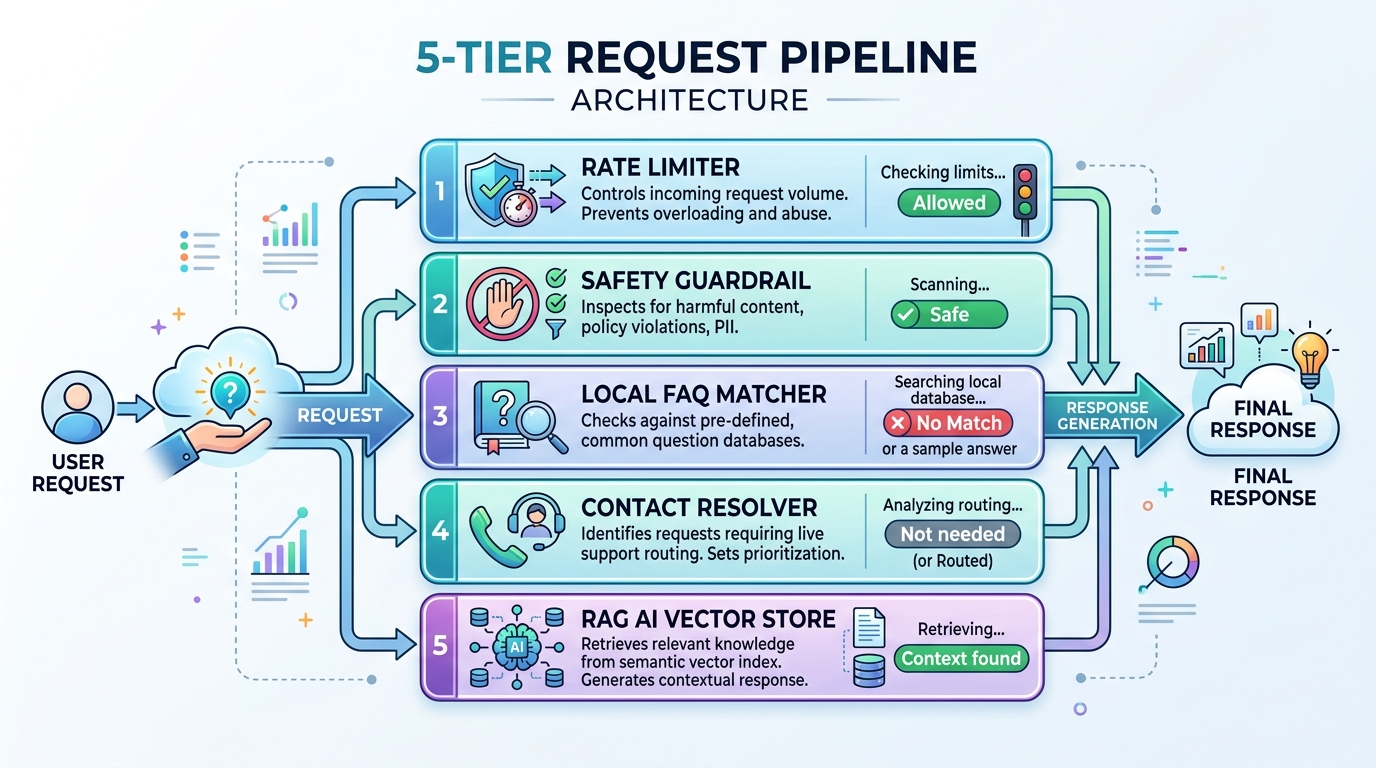
Visitor asks a question
        │
        ▼
Tier -1 — Rate Limiter          → too many requests? → stop here, HTTP 429
        │ (pass)
        ▼
Tier 0 — Safety Guardrail       → forbidden term detected? → blocked locally, 0 tokens spent
        │ (pass)
        ▼
Tier 1 — Local FAQ Match        → matches a known FAQ? → instant answer, 0 tokens spent
        │ (no match)
        ▼
Tier 2 — Contact Resolver       → asking how to get in touch? → local contact info, 0 tokens spent
        │ (no match)
        ▼
Tier 3 — RAG Retrieval          → search the vector store, pull the top relevant chunks
        │
        ▼
Tier 4 — AI Completion          → send question + chunks to Gemini / Groq / OpenAI / Ollama
        │
        ▼
Telemetry Logger                → record cost, tokens, and which tier answered
Four of those five tiers never touch an AI API at all. On a Celeron, that matters — every question answered by Tier 1 or Tier 2 is a question that never has to wait on a 0.5B model chugging through a prompt.
Tier -1: Rate Limiting
Handled by RateLimiter.php. Every incoming request is checked against the visitor's IP using a rolling time window — so many requests per so many seconds, both configurable in the admin panel. Go over the limit and the pipeline stops immediately with an HTTP 429, before anything else even runs. Cheap insurance against someone hammering your little laptop with requests.
Tier 0: Safety Guardrail
Handled by ChatbotHandler.php. Incoming text gets checked against a configurable blacklist of restricted terms — things like exploit or admin_password. Anything that matches gets blocked locally with a safety notice, and — same as every tier above the AI call — costs zero tokens.
Tier 1: Local FAQ Matching
Handled by FaqResolver.php. This compares the visitor's question against FAQ entries defined right in your Grav page frontmatter, plus their known phrasing variations. A match returns an instant, pre-written answer — no AI involved — and can even show interactive Yes/No buttons if the visitor wants to escalate to a full AI answer.
Tier 2: Contact Intent Resolution
Handled by ContactPageResolver.php. Questions like "how do I email support?" or "where's your office?" get detected and answered directly from your /contact page frontmatter (or a hidden /hidden-contacts page for support-only details) — again, entirely locally.
Tiers 3 & 4: Real RAG Retrieval, Then the AI Call
Handled by Retriever.php and AiClientFactory.php:
- The visitor's question gets converted into an embedding vector — using whichever engine you've configured (a local TF-IDF option, or Ollama, Gemini, or OpenAI's embedding models).
- That vector gets compared against everything stored in
user/data/ai-chatbot/rag_index.sqlite, using cosine similarity, in under 1 millisecond. - Only the top few (e.g. 3) most relevant chunks come back — not whole pages.
- Those chunks get injected into the system prompt alongside the visitor's question, and the whole thing is sent to whichever AI provider you've configured: Google Gemini, Groq, OpenAI, OpenRouter, or good old local Ollama.
So the "zero-model RAG" idea from the earlier version didn't disappear — it just became one option (the local TF-IDF path) instead of the only option. If you want to keep everything running on your Celeron with no cloud calls at all, that's still fully supported; you just now also have the choice to route the final answer to a cloud provider if you want faster or higher-quality generation for that step.
Why Build a Custom RAG Engine Instead of Using Grav's Default TNTSearch?
A common question is: Grav already has a popular search plugin (TNTSearch) — why write a custom RAG engine from scratch?
While TNTSearch is fantastic for site-wide keyword search bars, it presents three major bottlenecks when feeding data to an AI model:
- Monolithic Page Bloat vs. Heading-Aware Chunks (
Chunker.php):
TNTSearch indexes entire pages as single large documents. Returning a 2,000-word page to answer a 10-word question wastes thousands of prompt tokens. The custom RAG engine breaks pages into targeted 150–300 word section chunks bounded by# H1,## H2, and### H3headers. - Keyword Match vs. Multi-Driver Vector Search (
VectorStore.php):
TNTSearch relies on exact BM25 keyword matching — if a visitor asks "When is the office open?" but your page says "Business Hours", keyword search can miss. The custom RAG engine supports vector embeddings (Ollamanomic-embed-text, Geminitext-embedding-004, OpenAI, and local TF-IDF) with cosine similarity. - Direct Section Anchor Deep Links:
TNTSearch only links to main page routes. The custom RAG engine attaches exact section anchors (e.g./docs/install#prerequisites) so the AI can cite pinpoint URLs.
Keeping the Search Index Fresh
None of the above works if the search index is stale, so there's a proper ingestion pipeline behind it:
Grav pages (published) → strip nav/CSS, keep clean text → chunk by heading → hash check → vector store- Heading-aware chunking (
Chunker.php): pages are split into sections based on their Markdown headers (#,##,###), and each chunk is tagged with the page title, route, section name, and a direct anchor link — so an answer can point back to, say,/docs#requirementsinstead of just "somewhere in the docs." - Incremental SHA-256 hash caching (
Indexer.php): before spending any API calls on re-embedding a section, the indexer hashes it and checks that hash against what's already stored. Unchanged sections get skipped entirely — so editing one paragraph doesn't re-index your whole site. - SQLite vector storage (
VectorStore.php): chunks, metadata, and the float vectors themselves all live in one SQLite file. Cosine similarity and keyword overlap scoring both run in under a millisecond — no separate vector database server required.
Re-indexing also isn't something you have to remember to run by hand: the plugin listens for Grav's onPageSaved and onPageDeleted events and re-chunks a page the moment you save it, and there's an optional scheduled job (ai-chatbot-rag-reindex) via Grav's built-in scheduler — a normal 5-field cron expression, defaulting to 0 2 * * * (2 AM daily) — for a periodic full sweep.
Knowing What It's Doing: Telemetry
Every single query — whatever tier answers it — gets logged to user/data/ai-chatbot/interactions.json, recording token usage, which tier resolved it (faq_match, rate_limit, guardrail, contact_resolver, or rag_ai), and an estimated cost in USD. The admin dashboard turns that into simple SVG bar charts and query distribution breakdowns, and can even surface candidate FAQ entries — questions that keep reaching the AI tier and might be worth promoting up to an instant Tier 1 answer.
That last bit turned out to be genuinely useful: it's a running list of "things people keep asking that I should just answer directly," generated for free from real traffic.
Installing It on Your Own Grav Site
The full plugin is open source on GitHub:
👉 github.com/milkboyinchina/grav-ai-chatbot
Requirements
- A running Grav CMS site.
- Ollama installed and running locally if you want a fully local setup (
systemctl status ollama), and/or API keys for Gemini, Groq, OpenAI, or OpenRouter if you'd rather use a cloud provider for the final answer. - A lightweight local model pulled, if using Ollama:
ollama pull qwen2.5:0.5b
Install the plugin
cd /var/www/html/grav/user/plugins
git clone https://github.com/milkboyinchina/grav-ai-chatbot.git ai-chatbot
Build the initial index
cd /var/www/html/grav
php bin/plugin ai-chatbot index-rag --rebuild
From there, everything else — FAQ matching, contact resolution, rate limiting, re-indexing on save — runs automatically.
Real-World Performance on the N4100
When a question does make it all the way to Tier 4 and gets routed to the local Ollama model, keeping retrieved chunks small still triggers prefix caching the same way it did in the original version — loading prompt state almost instantly out of the 8 GB of DDR4 RAM:
cached n_tokens  = 400
prompt eval time =   230.65 ms /   1 tokens (230.65 ms per token, 4.34 tokens/s)
eval time        = 40079.61 ms / 144 tokens (278.33 ms per token, 3.59 tokens/s)
total time = 40310.25 ms / 145 tokens| Metric | Raw, uncached query | Full pipeline (Tiers -1 to 4) |
|---|---|---|
| Delay before first word | 30.78 seconds | 0.23 seconds (230 ms) for anything reaching the AI |
| Generation speed | 2.86 tokens/sec | 3.59–4.34 tokens/sec |
| Questions that never touch an AI model | 0% | Rate limits, blocked terms, FAQ matches, and contact questions all resolve locally |
| RAM used for a Tier 4 answer | ~4.5 GB (heavy buffers) | < 400 MB |
The best-performing tier, of course, is the one that never calls an AI model at all — and on a real site, a surprising chunk of traffic (greetings, FAQs, "how do I contact you") gets caught well before it ever reaches the Celeron's weak point.
RAG vs. No RAG: A Diet Plan for Your Prompts
Here's the part that made me genuinely grin at a spreadsheet. Before RAG, this chatbot's "context strategy" was basically a toddler packing a suitcase: shove the entire website into the prompt, every single time, and hope the AI figures out what's relevant. After RAG, it's more like a minimalist packing for a weekend trip — grab exactly what you need, leave the rest in the closet.
| Metric | Without RAG (dump the whole site in) | With RAG (grab just the relevant bits) | The Damage |
|---|---|---|---|
| Context strategy | Every page, concatenated, every query | Top 2–3 relevant chunks via SQLite search | 82% smaller |
| Prompt size per query | 204 tokens — and grows as your site does | 36 tokens — flat, no matter how big your site gets | 168 tokens saved, every single time |
| Local search time | 0.006 ms (just gluing strings together) | 0.312 ms (an actual indexed vector search) | Still under a third of a millisecond — basically free |
| Answer quality | Broad, noisy, prone to confidently making things up | Pinpoint, source-anchored, boring in the best way | Way fewer hallucinations |
| Monthly tokens (10,000 queries) | 2.04 million | 0.36 million | 1.68 million tokens never generated |
| Monthly API cost (at $0.15/1M tokens) | $0.31 | $0.05 | 82% cheaper — and yes, those are the actual monthly dollar amounts |
Let that last row sink in: we're talking about the difference between 31 cents and 5 cents a month. Nobody's retiring on those savings. But stretch the "without RAG" approach across a bigger site — 50, 100+ pages — and that per-query prompt keeps growing right along with it, eventually elbowing its way past 2,500 tokens per question. The RAG version doesn't care how big your site gets; it stays parked at 300–500 tokens forever, like it never even noticed you added a hundred more pages.
And the extra 0.3 milliseconds of search time it costs you to get there? That's not a typo — it's genuinely nothing. You've spent longer reading this sentence than the vector search took to run.
Conclusion: You Don't Need a Cloud GPU for This
You don't need an expensive GPU cloud instance or a complex vector database server to add a smart AI search box to your website. By leaning on Grav's flat-file structure, a lightweight SQLite vector store, a few cheap local checks before ever touching an AI model, and Ollama (or a cloud provider, if you want one), even a $50 Celeron laptop can deliver sub-second responses to most visitor questions — running on less power than most desk lamps.
The whole experiment — from "why is this so slow" to "it's now a tiered, self-hosted AI chatbot with its own analytics dashboard" — proves you don't need a $2,000 GPU to start playing with self-hosted AI. Sometimes a laptop headed for a drawer and a lot of stubbornness is all it takes.
Check out the repo, try it on your own Grav site, and feel free to open issues or pull requests:
🔗 GitHub: github.com/milkboyinchina/grav-ai-chatbot
- Part I: From 120 Seconds to Under 1 Second
- Part II: Setting Up Your Own AI Server
- Part III: Building an AI Chatbot for Grav CMS (You are here)