Ollama on Intel Celeron, Part I: From 120 Seconds to Under 1 Second
Ollama on Intel Celeron, Part I: Squeezing Local LLMs Out of a sub-$100 Laptop

Picture the "local AI" setup everyone talks about: a gaming rig with a glowing NVIDIA GPU that costs more than a used car. Now picture the opposite — an Intel Celeron N4100 mini PC with less than 8 GB of usable RAM, the kind of machine normally reserved for browsing your bank statement and nothing else. What happens if you point a local LLM at that?
Nothing good, at first. I asked it a question and then got to watch 120+ seconds of nothing — no cursor blink, no "thinking…", just silence. When it finally woke up, it started typing at a pace best described as "geologic": under 2 words per second. I've seen dial-up modems with better bedside manner.
Here's the twist, though: almost none of that 120-second wait was the AI actually "thinking." It was the CPU doing pointless busywork, over and over, on every single question. Once I figured out why it was so slow, and bolted on a tiny lookup trick powered by Grav CMS, that 120-second stare-at-the-wall moment shrank to under 1 second. Here's the whole story.
1. Meet your two enemies
Run an AI model on a cheap CPU with no graphics card, and you're fighting two completely different villains. Confuse them and you'll "fix" the wrong thing — like changing a flat tire because your car won't start.
Villain #1: Slow memory (controls typing speed)
Every single word the AI spits out means the CPU has to drag the entire model out of RAM and read through it — again. It's less "thinking" and more "flipping through the whole textbook to write one sentence, then doing it again for the next sentence."
The N4100 can only shuffle data out of RAM at around 19.2 GB/s in its weaker single-channel mode — not exactly a fire hose. That puts a hard ceiling on typing speed, roughly 2.8 to 4 words per second, and no clever trick or optimization will punch through it. This is a physics problem, not a software problem.
Villain #2: Missing math shortcuts (controls the awkward silence before it starts)
Modern AI runtimes lean hard on special CPU tricks (AVX2/AVX-512) that let a chip crunch a pile of numbers all at once instead of one at a time. Think "assembly line" vs. "one guy with a calculator."
The N4100's chip generation (Goldmont Plus) never got the memo — it's stuck doing math the old, one-at-a-time way. Feed it a meaty 500-word question, and it disappears into that calculator-guy routine for 30 to 45 seconds before saying a single word back.
The upshot: slow memory caps how fast it types, and missing math shortcuts cap how long you stare at nothing before it starts.
2. Show me the receipts
Talk is cheap — here are the actual logs from Ollama running on this poor little chip.
Exhibit A: asking cold, no shortcuts
The AI has to chew through 191 fresh words with zero help:
prompt eval time = 30776.58 ms / 191 tokens (161.13 ms per token, 6.21 tokens/s)
eval time        = 59510.49 ms / 170 tokens (350.06 ms per token, 2.86 tokens/s)
total time       = 90287.07 ms / 361 tokens
Translation: 30.7 seconds of dead air before a single word appears, then typing crawls along at under 3 words/sec. Total round trip: about 90 seconds — long enough to make a coffee and regret every decision that led you here.
Exhibit B: the same request, but smarter
This time, 400 words of context were already sitting in memory from before, so the CPU didn't have to redo that work:
cached n_tokens  = 400
prompt eval time =   230.65 ms /   1 tokens (230.65 ms per token, 4.34 tokens/s)
eval time        = 40079.61 ms / 144 tokens (278.33 ms per token, 3.59 tokens/s)
total time       = 40310.25 ms / 145 tokens
That dead-air wait? Down from 30.7 seconds to 0.23 seconds — basically instant. Typing speed barely budged (remember, that's Villain #1's territory, and it plays by physics, not vibes), but the miserable part — the waiting — practically vanished.
3. The fix: stop making the poor CPU re-read everything
The trick above only works if you stop shoving giant walls of text at the AI on every single request. So the real fix is: hand it a tiny, relevant snippet instead of an entire page.
This is the classic Retrieval-Augmented Generation (RAG) move — look up the relevant bit first, then only hand over that.
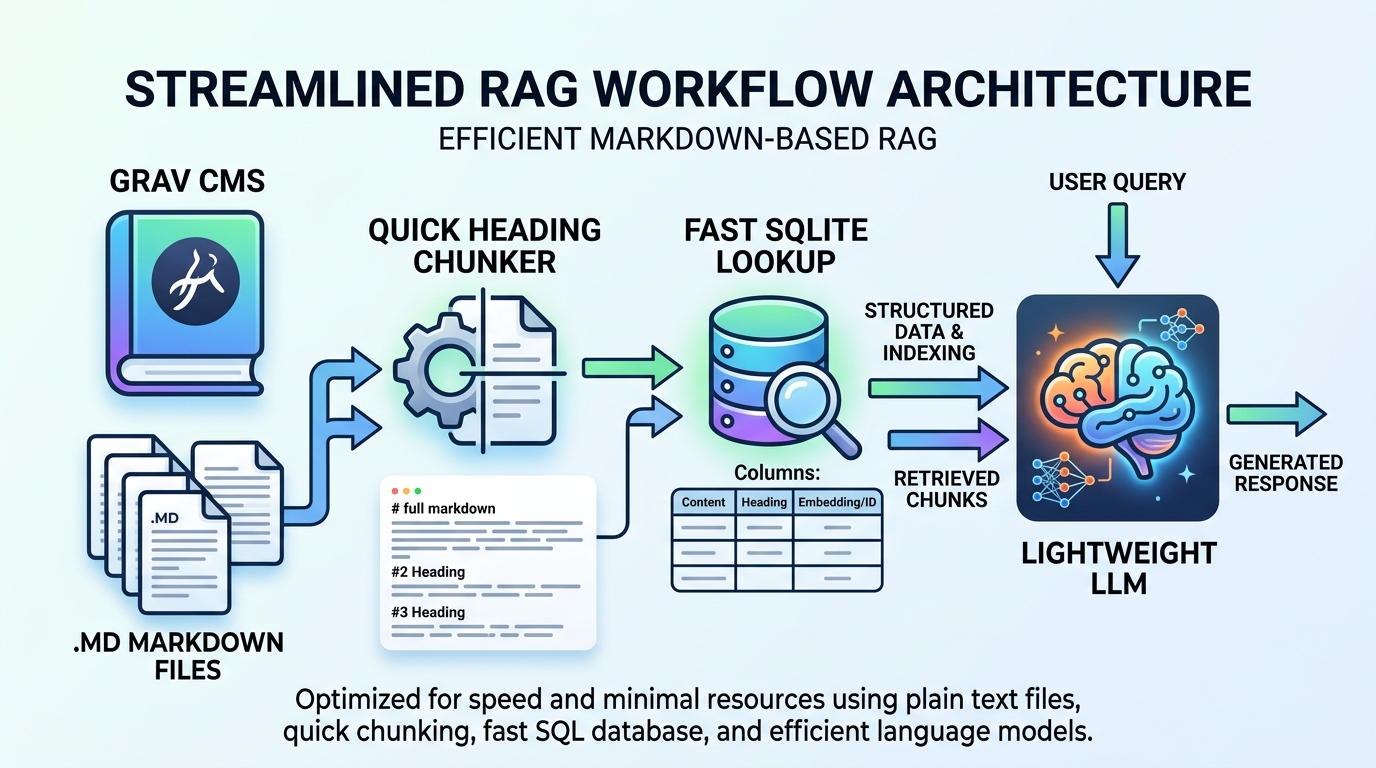
Most RAG tutorials will point you toward a "vector database," which is extra software that itself eats RAM and CPU for breakfast. On a machine this weak, that's like hiring a personal trainer to help you save energy.
So instead, I used something that was already sitting there doing nothing: Grav CMS, which stores everything as plain Markdown files instead of a database. Turns out that's a search engine's dream — no extra AI, no extra software, just files.
Here's the whole pipeline:
[User asks a question]
       │
       ▼
[Tiny script strips filler words]   →  "summarize," "explain," etc. get tossed
       │
       ▼
[Search Grav's Markdown index]      →  instant, no extra AI needed
       │
       ▼
[Grab the ~150 relevant words]
       │
       ▼
[Hand *only that* to Ollama]        →  fast answer, even on ancient hardware
Why this works so well on a potato
- Zero scraping drama. Content already lives as clean Markdown in
user/pages/— no headless browsers, no HTML parsing headaches. - No AI needed just to search for AI. A lightweight flat-file search index (running on SQLite) can dig through thousands of page sections in under 5 milliseconds, barely touching the CPU.
- A little word-cleaning goes a long way. A search engine chokes on "summarize home page content." Strip the instruction words and you're left with
"home"— and suddenly it finds the right page instantly.
4. Before vs. after — the glow-up
| Metric | Before (raw prompt) | After (Grav CMS + caching) |
|---|---|---|
| Text sent to the AI | 500+ words, nothing cached | ~150 words (or 400+ reused) |
| Awkward silence before it starts | 30.7 seconds | 0.23 seconds |
| Typing speed | 2.86 words/sec | 3.59–4.34 words/sec |
| Total time per answer | ~90 seconds | ~40 seconds |
| Extra memory burned | A lot | Barely any |
5. Cheat sheet for fellow homelab masochists
- Get dual-channel RAM if you can. Two sticks instead of one can nearly double your typing speed. It's the closest thing to a free lunch here.
- Don't bring a heavy vector DB server to a Celeron fight. No AVX2 means no business running a second background AI model just for search. Plain old lightweight indexing (SQLite) will smoke it and barely notice.
- Recycle your work. Keep your system prompt identical across requests so the AI can reuse what it already calculated instead of starting from scratch every time.
- Less is more. A tight, focused 150-word snippet beats dumping a whole page into the context window — faster and usually a better answer.
- Part I: From 120 Seconds to Under 1 Second (You are here)
- Part II: Setting Up Your Own AI Server
- Part III: Building an AI Chatbot for Grav CMS